The Attendee App for Your Indico Conference

Indico runs your programme. HEPCon puts it on your attendees' phones to browse, search and save to their own schedule, offline, and keeps it in step with Indico.

552 attendees used it at ICHEP 2026, synced from CERN Indico

Going to a conference that runs on Indico? Install the free HEPCon app (App Store, Google Play). If the conference isn't in its events list, paste its Indico link on the Events screen: the programme is on your phone in about 30 seconds, offline, until at least a week after the conference ends.

Give Your Attendees What Indico's Timetable Can't Deliver

You chose Indico because it's the gold standard for call-for-papers, peer review, and timetable management at scientific conferences. But once the programme is set and attendees are on site, Indico's job is done — and the mobile experience gap opens up.

HEPCon closes that gap without adding work to your side. Share your Indico event link once, and your conference is published as an event inside the HEPCon app. You get push notifications, a live organiser dashboard, and an offline-capable programme your attendees can actually use in a crowded plenary hall with no Wi-Fi. Indico stays your system of record. Nothing in your workflow changes.

  • Tracks, sessions, contributions, abstracts, authors, and rooms — all imported
  • LaTeX formulas and large author lists rendered correctly
  • Live schedule updates pushed to attendees — you update Indico, we push the change
  • Full offline access — works in basements, field stations, and congested networks

Used at events on the Indico servers of CERN, DESY, Fermilab, IN2P3, INFN, Nikhef and Jefferson Lab, a university's own Indico, indico.global, and societies' own servers. See case studies →

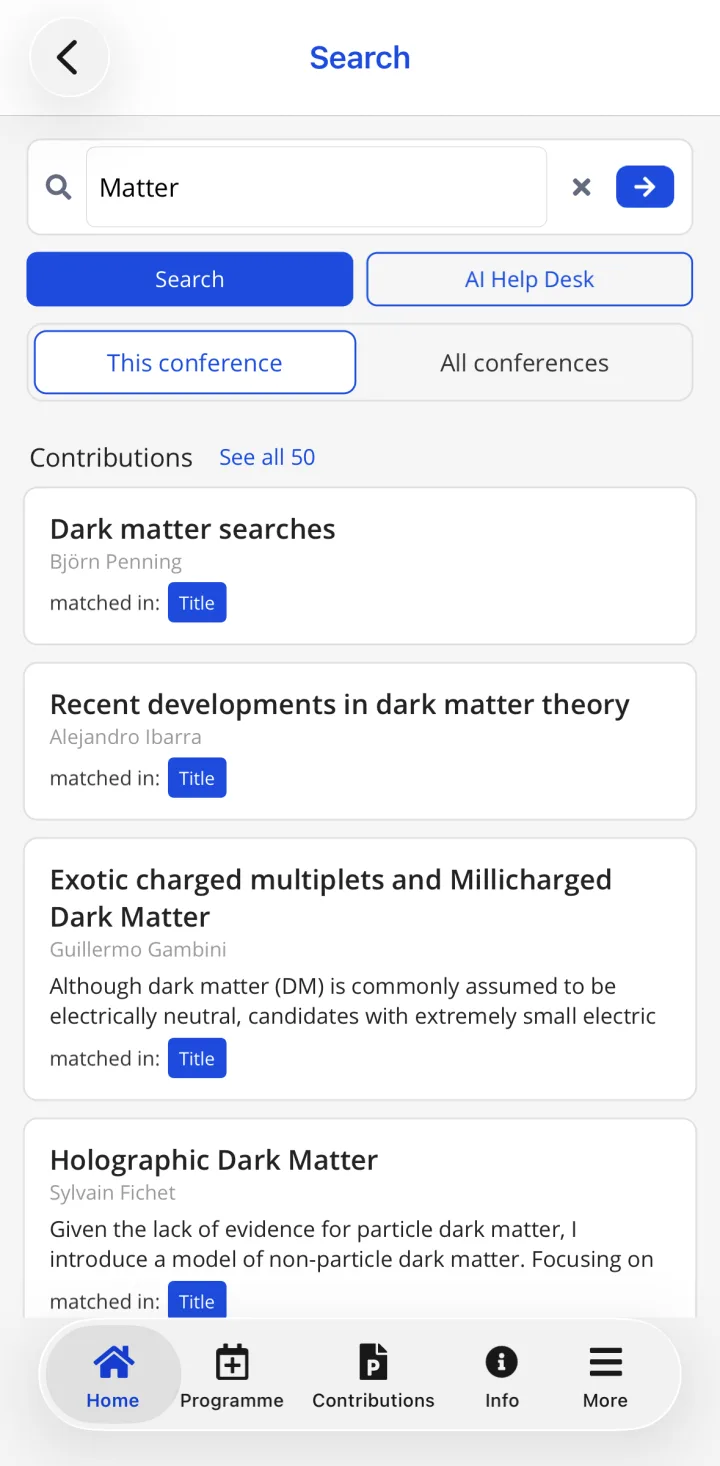
HEPCon search at ICHEP 2026: talks matching “Matter”, each with its speaker and the start of its abstract

Search at ICHEP 2026, synced from CERN Indico

What You're Left Managing When Indico Is Your Only On-Site Tool


  • The help desk queue grows at registration. Indico's nested timetable tree is built for conveners. On a phone during a coffee break, attendees can't navigate it — and they come to you.
  • You update the room in Indico. Attendees find out by accident. There's no push path from Indico to participants' phones. A room change means emails, notice boards, and confused clusters in the corridor.
  • The venue network collapses by mid-morning. Hundreds of attendees share the venue Wi-Fi, and Indico's timetable needs a connection. When the Wi-Fi slows, your programme is out of reach exactly when attendees need it.
  • Every attendee navigates parallel tracks alone. On a phone, a day of parallel sessions in Indico's timetable means zooming and scrolling sideways to compare what is on, which nobody does well in a coffee break.
  • Slide links and materials are buried. You've attached PDFs and proceedings in Indico. Attendees can rarely find them on site, so you get requests for the links after the event ends.
HEPCon solves all of these — without touching your Indico setup or duplicating the programme. Try it free with your Indico link → Curious what happens after you paste the link? How instant previews work.

What Your Attendees See Instead


An Indico conference in HEPCon, screen by screen: synced from Indico, not retyped.

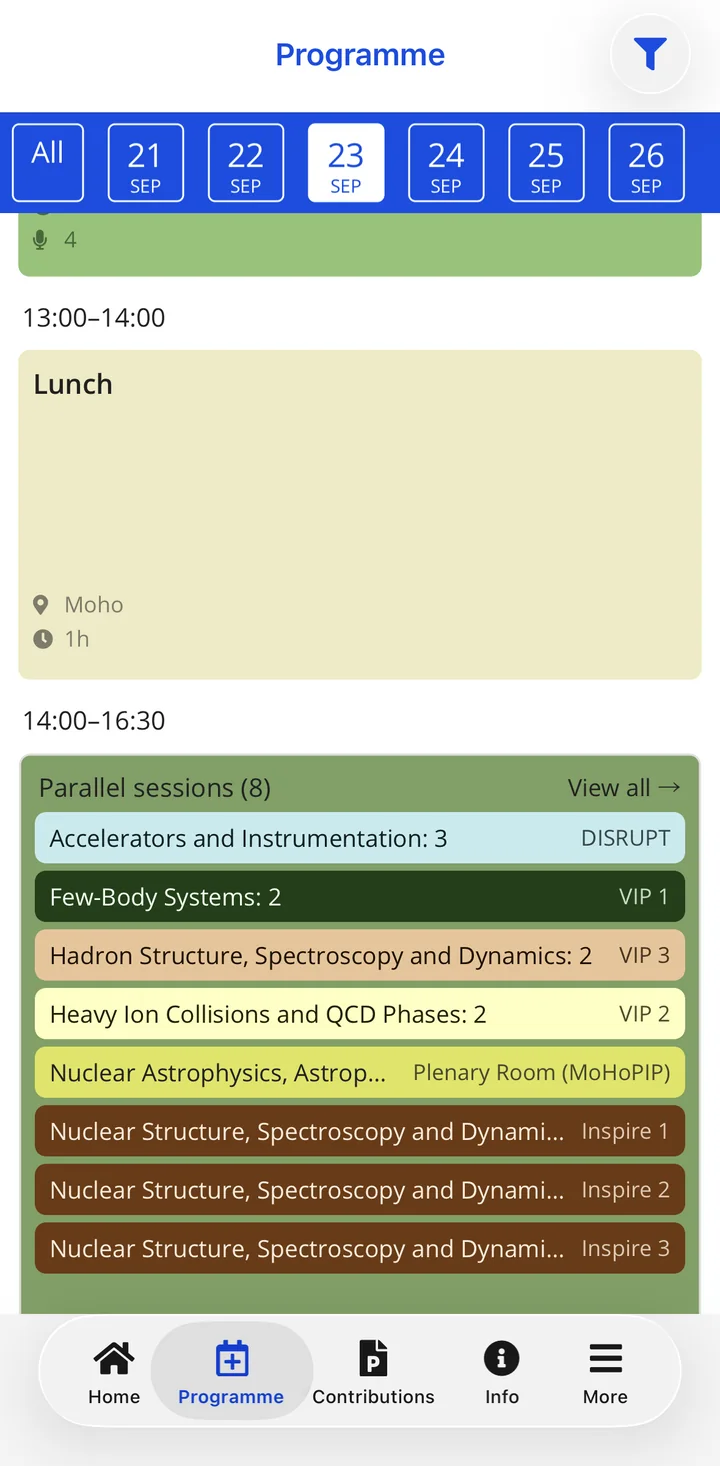
Eight parallel sessions, one screen

The day's programme lists every session running at 14:00 with its room. Nobody pages through a PDF to find out what is on.

HEPCon programme for 23 September at EuNPC 2025: eight parallel sessions from 14:00, each with its room

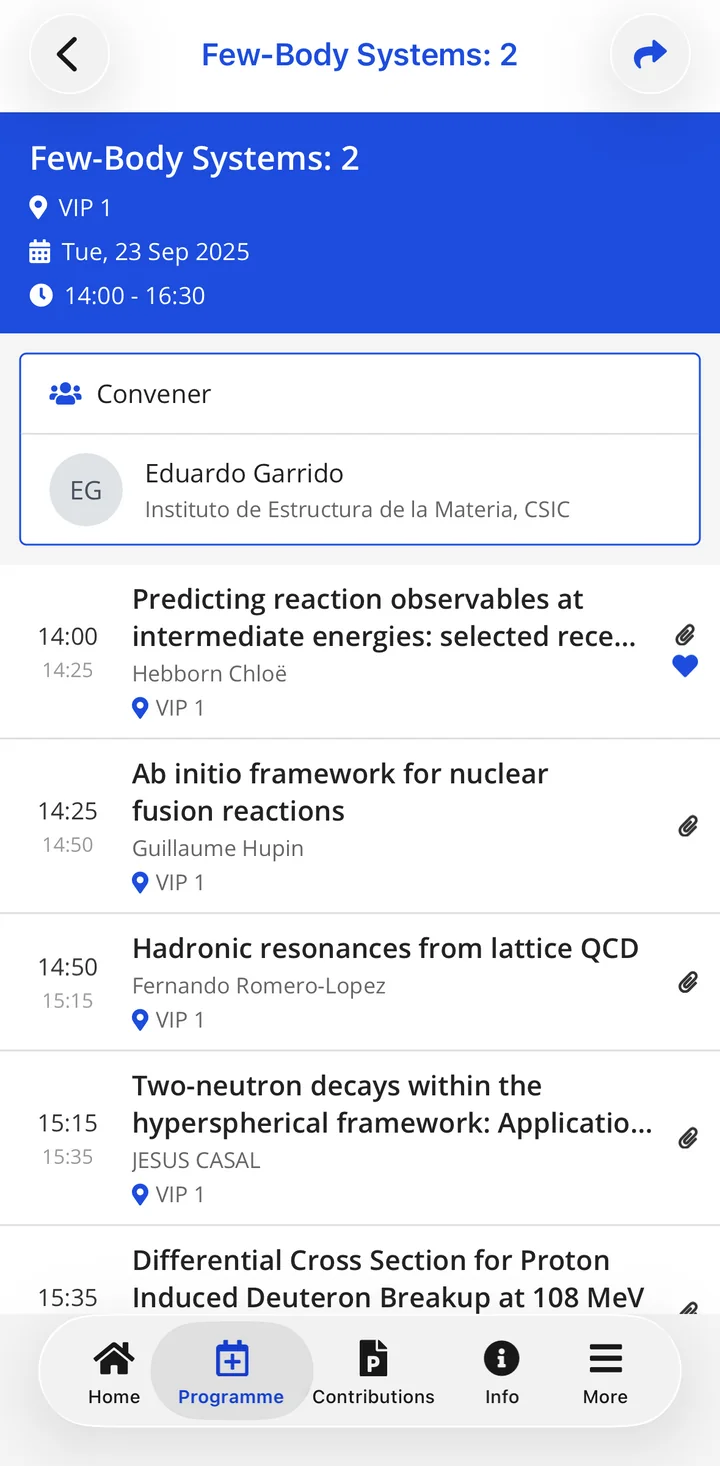
Each session with its talks in order

Open a session to see its room, its time, its convener, and the talks in the order they will be given.

A session page in HEPCon: room, time, convener and its talks in order

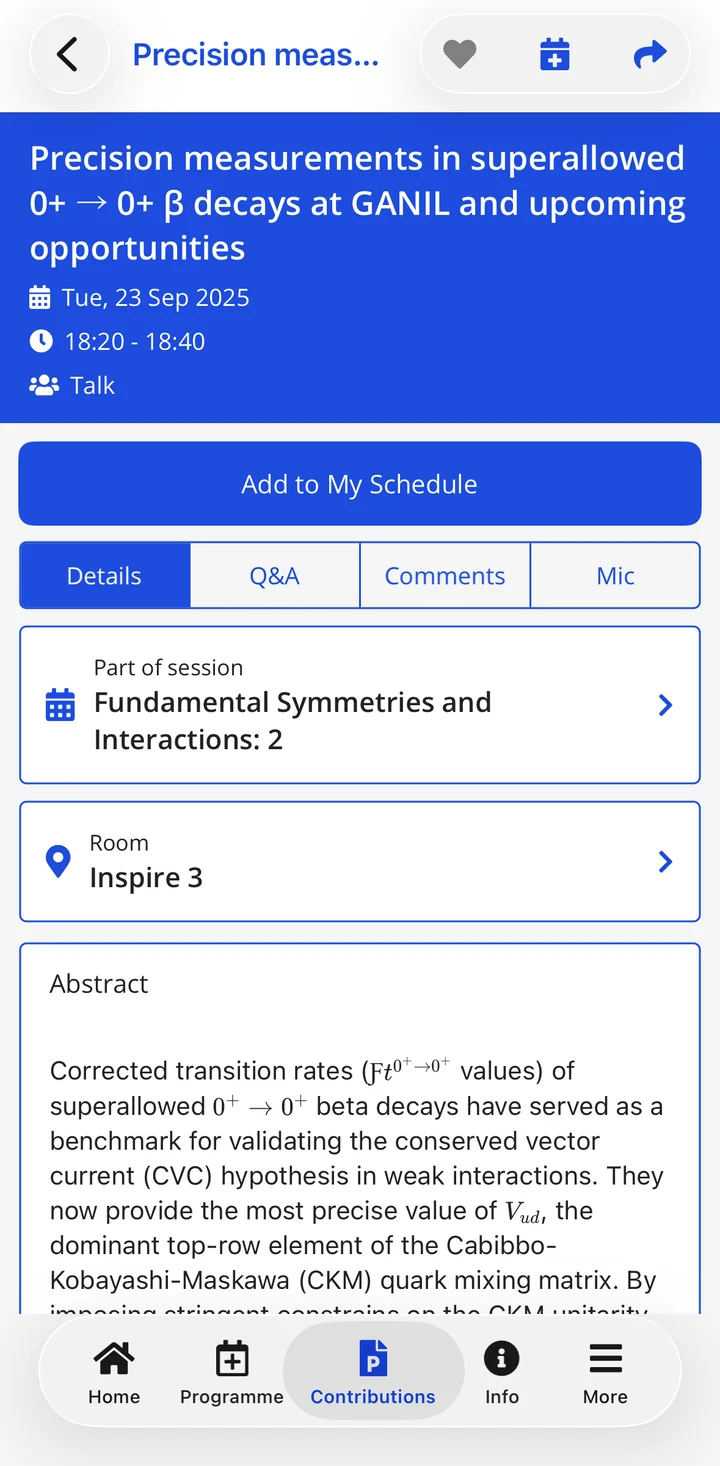
Abstracts with their mathematics intact

A talk page carries the full abstract. Formulas are typeset the way the author wrote them, not shown as raw markup.

A talk page in HEPCon: title, time, room, and an abstract with its mathematics rendered

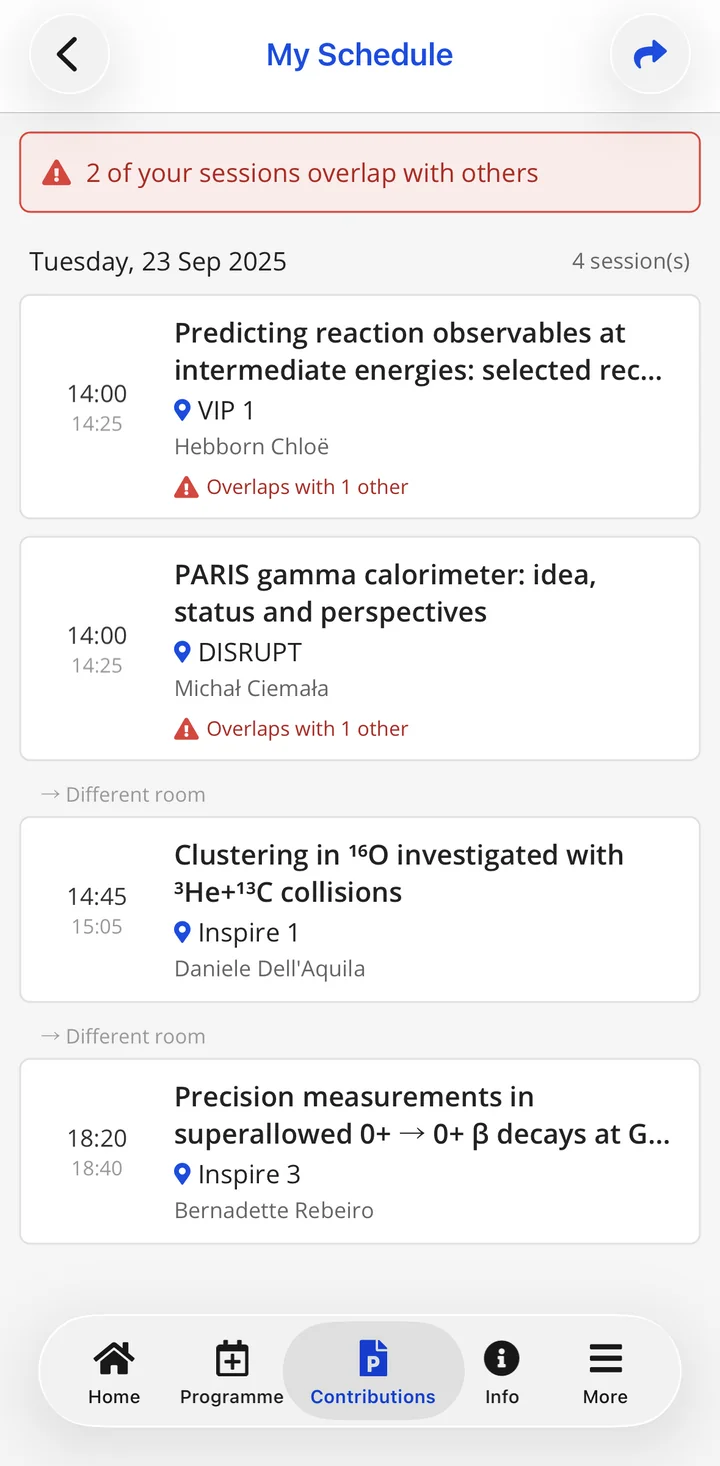
A warning when two saved talks collide

Attendees save the talks they want into My Schedule. When two of them overlap, the app flags the clash.

My Schedule in HEPCon warning that two saved talks at 14:00 overlap

Screens from EuNPC 2025 in Caen, as its attendees saw them.

From Your Indico Timetable to an Attendee-Ready View


HEPCon reads what your Indico event publishes and reshapes it for a phone screen — without losing structure, LaTeX, or large author lists.

In your Indico timetable

Session       Higgs Physics — Parallel A
Starts        20 May 2026, 09:00
Room          Salle des Conférences
Contribution  H → γγ at $\sqrt{s}$=13.6 TeV
Track         Higgs
Speaker       Sarah Mitchell, CERN
Authors       ATLAS Collaboration (498)
Attachment    slides.pdf

What an attendee sees

HiggsWed 20 May 09:00 · Salle des Conférences

H → γγ at √s = 13.6 TeV

Sarah Mitchell, CERN
+ ATLAS Collaboration (498 authors)

My Schedule Slides Share

LaTeX rendered, every author findable by name, slides one tap away, and room or time changes reach the phone.

How HEPCon Keeps Up with Indico


You keep working in Indico. HEPCon reads your event from Indico's export and keeps the app in step with it.

What comes across

Sessions, contributions, tracks, rooms, breaks, speakers, authors and attached files. Tracks become filters, sessions become the day's time blocks, and each talk carries its slides and papers. Contributions without a time slot, such as posters, are kept, and you decide whether attendees see them.

When you change Indico

HEPCon re-reads your event link on a schedule we set with you, works out what changed, and updates attendees' phones. Moved rooms and times are listed in the app under programme changes, and can go out as a push notification, sent by you or automatically.

A check before every update

If a sync looks wrong (the programme suddenly half empty, or a login page where the export should be), it is held instead of published until we have checked it. Problems in the export show as warnings on the sync card in your organiser dashboard.

Your organiser dashboard

Send push notifications, post announcements and follow how attendees use the app, without touching Indico. See the organiser dashboard →

For Indico administrators

What HEPCon Actually Touches (and What It Never Does)


The questions your IT and Indico admins will ask — answered up front.

  • Reads the event export, nothing else. HEPCon reads Indico's standard event export — for a public event, the same data your event page already publishes.
  • Any Indico instance. Not just CERN — events on DESY's, Fermilab's, Nikhef's and IN2P3's Indico, on the University of Münster's, on indico.global and on societies' own servers have run on HEPCon.
  • Timezone comes from Indico. Your event's declared timezone is treated as authoritative — times render correctly in the venue zone and in each attendee's own.
  • No plugin to install. Nothing is added to your Indico server, ever.
  • No server access, no admin credentials. The sync is a one-way read; HEPCon never writes to Indico.
  • Protected event? If your event's export isn't public, a read-only API token is enough, or talk to us about another way in.

When Your Speakers Come Back Next Year


Most physics conferences are part of a series. HEPCon was built for that.

ICHEP, EPS-HEP, CHEP, TWEPP, ACAT — each runs every year or every other year. Your speakers come back. Your reviewers come back. Your programme committees overlap. Most conference apps treat each event as an island and then move on. HEPCon does not.

When a researcher speaks at several conferences in HEPCon, their page lists every talk across the series under “Also at other events”, with their role and the conference name. They are matched by ORCID, INSPIRE-HEP or email, and one tap opens that talk in its own conference.

A matched speaker has one shareable link that works across conferences. How speakers are followed across events →

A. Bergström — Physicist

ICHEP 2024: Plenary on electroweak precision

EPS-HEP 2025: Poster, same collaboration

TWEPP 2025: Co-authored detector talk

One URL. Three events. Tap any row to land on that talk.

Indico Conferences in HEPCon


ICHEP 2026 cover
ICHEP 2026 profile

ICHEP 2026

2026 • Natal, Brazil

1023 contributions · 192 sessions

HEPCon carried ICHEP to South America — the third ICHEP edition in the app after Bologna 2022 and Prague 2024. 552 attendees used it across a 1,023-contribution programme in 192 sessions, saving 1,624 talks to personal schedules.

ICHEP particle physics flagship conference Brazil CERN Indico parallel sessions conference series

View case study
CHEP 2026 cover
CHEP 2026 profile

CHEP 2026

2026 • Bangkok, Thailand

591 contributions · ~200 (est.) sessions · 9 tracks

HEPCon ran the official CHEP 2026 conference app in Bangkok — the fourth CHEP edition in the app, after Sofia 2018, Adelaide 2019 and Norfolk 2023.

CHEP HEP Computing Bangkok Chulalongkorn sustainable computing Indico distributed computing simulation software

View case study
LHCP 2026 cover
LHCP 2026 profile

LHCP 2026

2026 • Paris, France

344 contributions · 70 sessions · 10 tracks · 66 posters

HEPCon ran the official LHCP 2026 conference app in Paris — the fifth LHCP edition in the app, after Bologna 2018, Belgrade 2023, Boston 2024 and Taipei 2025.

LHCP LHC Large Hadron Collider Paris Sorbonne ATLAS CMS ALICE LHCb Indico

View case study

See all case studies →

Indico + HEPCon, answered


Is there a mobile app for Indico conferences?

Yes. HEPCon is a mobile conference app that works alongside Indico. Paste your Indico event link and your conference opens as an event inside the HEPCon app in about 30 seconds. Attendees browse it fully offline, and nothing in your Indico workflow changes.

Does HEPCon replace Indico?

No. Indico remains your system of record for call-for-papers, peer review, and timetable management. HEPCon is the attendee-facing presentation layer — it imports your Indico programme and delivers it as a mobile-first, offline-capable agenda. Both systems run in parallel without any duplication of work.

How long does it take to add an Indico conference to HEPCon?

It takes about 30 seconds from a public event link: paste it, confirm by email, and your preview opens in the app. For a protected event we build it within 48 hours from a read-only API token or another route we agree with you. Evaluating with your live data is free, with no credit card; the go-live decision is due one week before your event.

Does HEPCon handle LaTeX formulas in Indico abstracts?

Yes. HEPCon renders mathematical notation correctly in talk titles and abstracts. Long author lists, special characters, and LaTeX-formatted content are handled natively — unlike generic event apps that strip or corrupt scientific formatting.

Does it work with our own Indico server, not CERN's?

Yes. Any Indico instance works: events on the Indico servers of DESY, Fermilab, IN2P3, INFN, Nikhef, Jefferson Lab and the University of Münster, on indico.global and on societies' own servers have run on HEPCon. Nothing is installed on your server.

What happens when we change the timetable in Indico?

HEPCon re-reads your event link on a schedule we set with you, works out what changed and updates attendees' phones. Moved rooms and times are listed in the app, and can go out as a push notification.

Not using Indico? HEPCon also works with:

Your Indico Programme Deserves a Better Last Mile


Paste your Indico event link and see your conference inside HEPCon in about 30 seconds. Protected event? We build it within 48 hours from a read-only API token or another route we agree with you.

  1. 1 Paste your link We recognise the platform as you type.
  2. 2 Confirm by email One click, so only you can build your programme.
  3. 3 Open your programme Built in about 30 seconds, yours to share.
One row per talk. Columns: title (required), plus optional session, date (YYYY-MM-DD), start/end (HH:MM), speakers (semicolon-separated), affiliations, room, track, abstract. Odd column names? We map them for you. Download a template.
← Paste a programme link instead

No credit card required. Your preview is private and unlisted.

Rather see a live one first? Open ICHEP 2026 or CHEP 2026, both synced from Indico, in the free app (App Store, Google Play).

Evaluate free with your live data — the go-live decision is due one week before your event. No credit card required. Prefer a guided tour? Book a 20-minute call.